
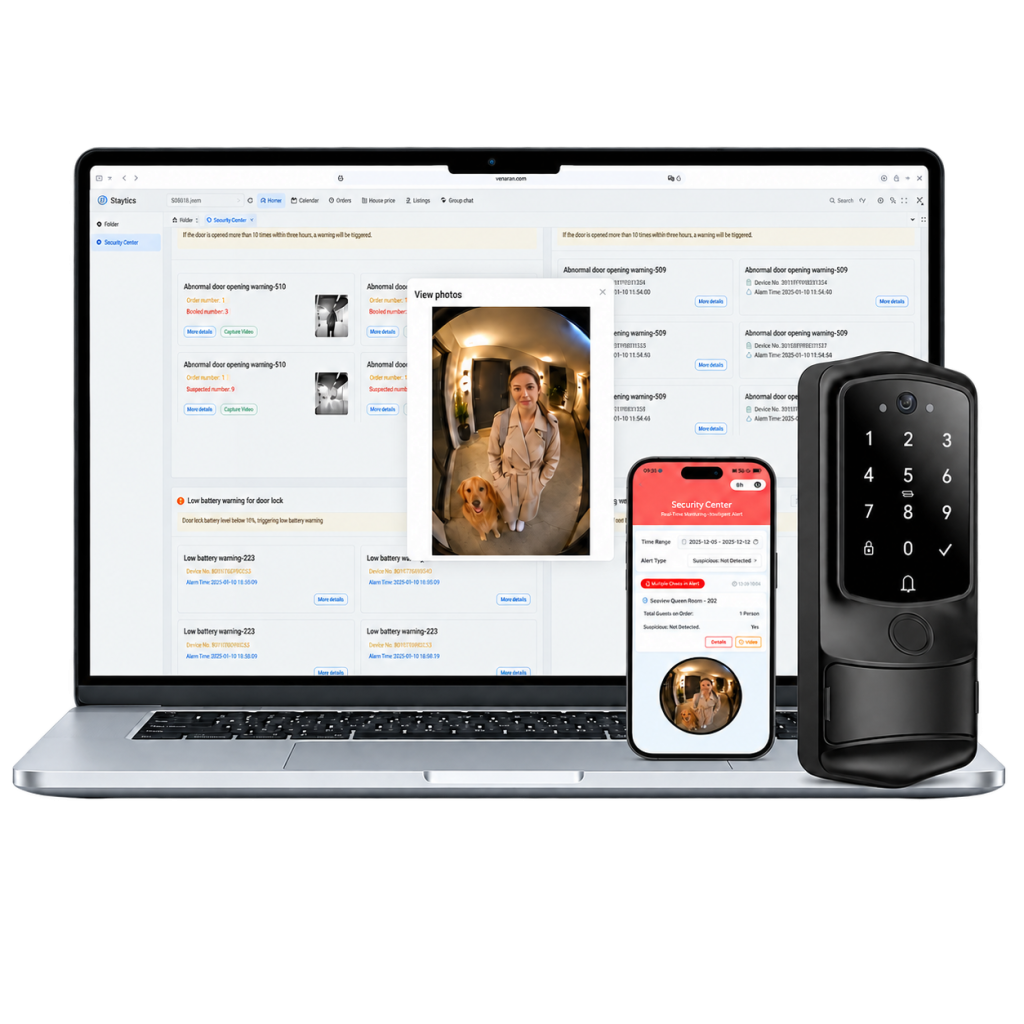
H1-Pro AI Video Smart Lock with WiFi, PMS System, OTA Integration, Remote Access - Security Door Lock for Vacation Rental, Hotel, Apartment
1. BUILT FOR VACATION RENTALS
Designed for Airbnb hosts, vacation rental owners, property managers, and multi-property operators. H1 Pro connects smart access with Staytics to bring guest stays, property activity, cleaning, and daily operations together.
2. AI CAMERA FOR PET & EXTRA GUEST ALERTS
The built-in AI camera can identify suspected pets and extra guests based on reservation guest count. Get alerts with related event videos and review them anytime from your phone or computer.
3. FREE PMS + OTA CONNECTIVITY
Staytics includes a free PMS platform and connects with major OTA platforms to bring bookings and property operations together. Already using a PMS you know and trust? Staytics can also connect with supported third-party PMS platforms.
4. 5 SMART ALERTS FOR KEY PROPERTY EVENTS
Stay informed with five key alerts: Extra Guest, Suspected Pet, Missed Cleaning, Suspected Tampering, and Low Battery. If cleaner access isn’t detected during the scheduled cleaning window, Staytics can also notify you with a Missed Cleaning Alert.
5. 10-YEAR WARRANTY + 15-DAY RETURNS
Every H1 Pro includes a 10-Year Limited Warranty with free replacement for eligible product failures not caused by misuse or accidental damage. Plus, enjoy a 15-Day Return Policy for added peace of mind. Terms and conditions apply.
Basic Information
| Product Type: | Single Box Product |
| Product Name: | H1-Pro AI Video Smart Lock with WiFi, PMS System, OTA Integration, Remote Access - Security Door Lock for Vacation Rental, Hotel, Apartment |
Product Description
.png)
.png)
.png)
.png)
.png)
.png)
.png)
.png)
.png)
.png)
.png)
.png)
.png)
10 reviews for H1-Pro AI Video Smart Lock with WiFi, PMS System, OTA Integration, Remote Access – Security Door Lock for Vacation Rental, Hotel, Apartment
Shipping
Shipping Fee: $0.00
Estimated delivery time varies by location
Returns
30-day return policy
Products can be returned within 30 days of delivery
Warranty
Quality Guaranteed
Contact seller for warranty claims
Terry M. –
The booking said two adults, no pets. Not long after the guest opened the door with the code, my phone buzzed — suspected pet, with a few seconds of video attached. I opened it: a golden retriever. I didn’t confront anyone. I just sent the screenshot and said the booking didn’t list a pet, so please add the pet cleaning fee. They were gracious about it and paid right away. Before this I’d only find out at turnover, when the guest is already gone and there’s nothing left to say.
Denise R. –
What I dread in this business isn’t pets — it’s the arguments. “My dog never got on the bed.” “That hair on the couch isn’t my dog’s.” I’ve had too many of those conversations. Now, when the door opens and people come in, whether a pet came in and roughly what size it was are on record. I don’t need it to chase money. I just need something to point at when the topic comes up. That’s why I bought it in the end — not as a fining tool, but as a record that settles a question.
Nate H. –
My place is up in the mountains and half my guests bring a dog — a lot of them never read the rules, they just assume a dog counts as family and is welcome. I used to find out at turnover, either by smell or by the marks on the couch, and by then the deposit was long gone. The first alert came on a Friday night: a family of three came in with a Labrador behind them. The notification landed quickly, I collected the pet fee that same evening, and it was an easy conversation — I wrote, “I see you brought a dog, it isn’t listed on the booking, just add the pet fee and the dog can stay.” Nobody argues with that.
Marcus T. –
My permit allows 8 guests, and a retired couple lives downstairs — I paid a noise fine two years ago. On a Saturday night last month my phone alerted me: 14 people through the door, 6 on the booking. I didn’t call, and I didn’t drive over. I sent one message: the system shows 14 people on site, my permit allows 8, please correct it within half an hour. Twenty-some minutes later it was down to 6. I never showed up, and I never had to raise my voice.
Erica B. –
The first time I got one of these alerts I got nervous — I worried the guest would feel surveilled. I sent the screenshot and the guest actually apologized first, said some friends had come by and asked whether they needed to leave. I said no need, my cap on this place is six and just don’t bring anyone else in. They were cooperative and even offered to let the neighbors know. The whole thing was two or three messages over five minutes. The hard ones are the guests who insist “it’s just the few of us” — without something on record, all you can do is take their word for it.
Jennifer L. –
The hardest guests are the ones who book for two and then fill the house. On a Friday earlier this month the guests used the code just after four, and ten minutes later my phone went off: roughly eleven people on that one entry, against a booking of two. I was driving, so I pulled over and messaged them that the cap on this place is four and if that many people were already there, they needed to leave now. They replied quickly, said family had come to pick them up for dinner, and within five minutes everyone was gone. In those ten minutes the neighbors never caught on, and I was already done with it.
Amanda L. –
One summer a guest checked in at four, the cleaner had skipped my unit, and on the phone she told me she thought she was scheduled for the one next door. I refunded the night and ate a bad review. Now the cleaner has to enter with her code inside the cleaning window — if no entry is recorded, I get an alert. It fired once this peak season, I called backup two hours before the guest arrived, and the guest never knew. Two hours is the entire value of this feature.
Rosa M. –
My old routine was texting the cleaner on the morning of check-in to ask whether the unit had been done, and when she was busy I’d get no reply and have to call. Now I open the dashboard and can see who used a code to enter which unit and when. Anything with no entry inside its window gets flagged to me. Two minutes over coffee and I don’t have to ask anyone all day. It sounds small, but it took me out of the chasing-progress business.
Hannah W. –
I used a lockbox. The price was changing the combination every two weeks, texting it to the next three guests, and always wondering whether the last guest had memorized it. Now I create a code against the reservation: valid only for their nights, dead on checkout day, and I send it myself. Reschedules are easy — drag the dates and the old code stops working. The most direct change is that I haven’t answered a check-in message after eleven at night in a long time.
Derek A. –
I bought it for guest check-ins, but the temporary codes turned out to be what I use most. A contractor for two days, a showing for half an hour, a friend stopping by to feed the dog — each gets a code that works only for that window and expires on its own, so I don’t have to track who still has access. I used to drive over just to unlock a door for these. Now it’s a few taps in the dashboard, and nothing has ever failed to expire.